
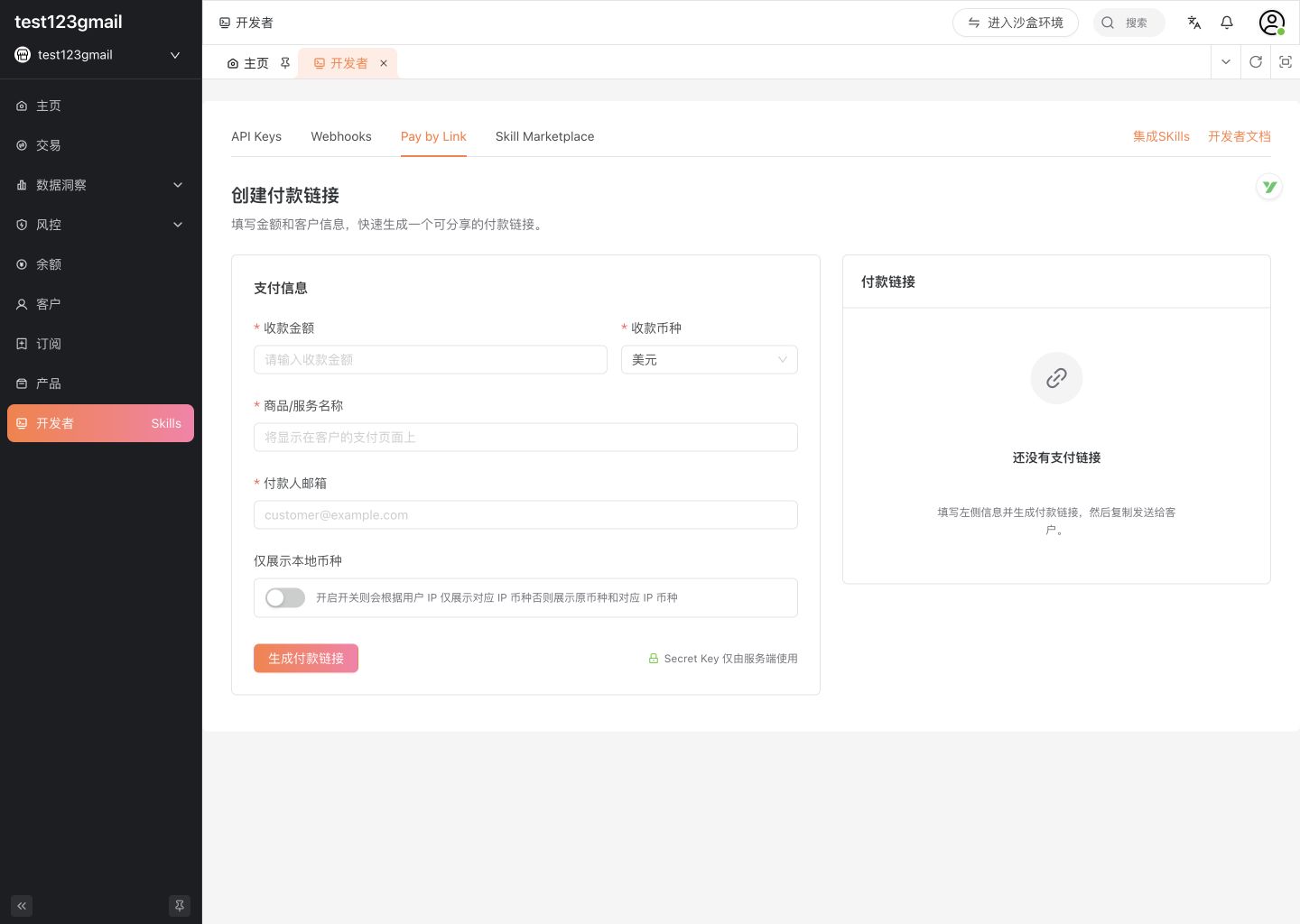
Clink has introduced Pay by Link, a new way for merchants to create and share payment links directly from the Dashboard.
Merchants can enter an amount, currency, product or service name, and payer email to generate a hosted checkout link, without building a separate checkout page or making an API call. The feature is designed for payments that sit outside a standard product checkout flow, including sales follow-ups, B2B transactions, support-led collections, and other one-off payments.
TL;DR
- Create a payment link from Developers → Pay by Link in the Clink Dashboard.
- Enter the amount, currency, product or service name, and payer email to generate a shareable checkout URL.
- Designed for one-off and non-standard payment scenarios that do not require a full checkout integration.
- Supports Clink’s global payment coverage across 135+ currencies and 100+ local payment methods.
What Pay by Link Is
Pay by Link provides a hosted checkout that can be created directly from the Clink Dashboard.
Instead of building a product page, cart, or checkout flow, a merchant enters the payment details and generates a URL. The payer opens the link and completes the transaction through a hosted Clink checkout.
The transaction does not depend on the merchant having a storefront or an active checkout integration in production.
This makes Pay by Link suitable for transactions that are initiated outside a product’s standard purchase flow.
API-based checkout remains appropriate for repeatable, product-embedded transactions such as SaaS subscriptions, marketplace purchases, or in-app payments. Pay by Link addresses a different type of transaction: payments created on demand for a specific customer or agreement.
Typical Use Cases
Pay by Link is designed around several scenarios where payment is required, but a conventional checkout flow is not available or necessary.
Sales follow-up
After a price or deposit is agreed during a sales conversation, the sales team can generate a payment link and send it directly to the customer.
This provides an alternative to waiting for a bank transfer, purchase order, or a separately configured checkout flow.
B2B payments
Some business transactions do not fit a standard subscription or ecommerce checkout model.
Examples include negotiated one-off orders, partner settlements, and service fees agreed over email or other business channels. A payment link provides a direct checkout for these transactions without requiring a dedicated integration.
Support-led collections
Support teams may occasionally need to collect an overage charge, reinstatement fee, or one-time adjustment outside the normal billing cycle.
Pay by Link allows these payments to be handled without adding a new payment flow to the product.
Non-standard checkout scenarios
The feature can also support transactions such as events, consulting services, custom orders, and other cases where a permanent storefront is not required.
How Pay by Link Works in Clink
Pay by Link is available in the Clink Dashboard under Developers → Pay by Link.
To create a link, merchants only need to provide the amount, currency, product or service name, and payer email.
An optional setting can also limit the displayed currency to the one associated with the payer’s IP location.
Once generated, Clink returns a shareable checkout URL that can be sent directly to the payer.